
How to segment users by course completion and activity
A segmentation groups people who meet rules. For example, you can track recent course completers without maintaining a manual list. The chosen criterion determines what the list actually proves.
You need permission to view and manage this feature on your platform.
On the platform, open your profile picture and choose the administrative panel. Then follow: Analytics → Segmentations → New Segmentation.
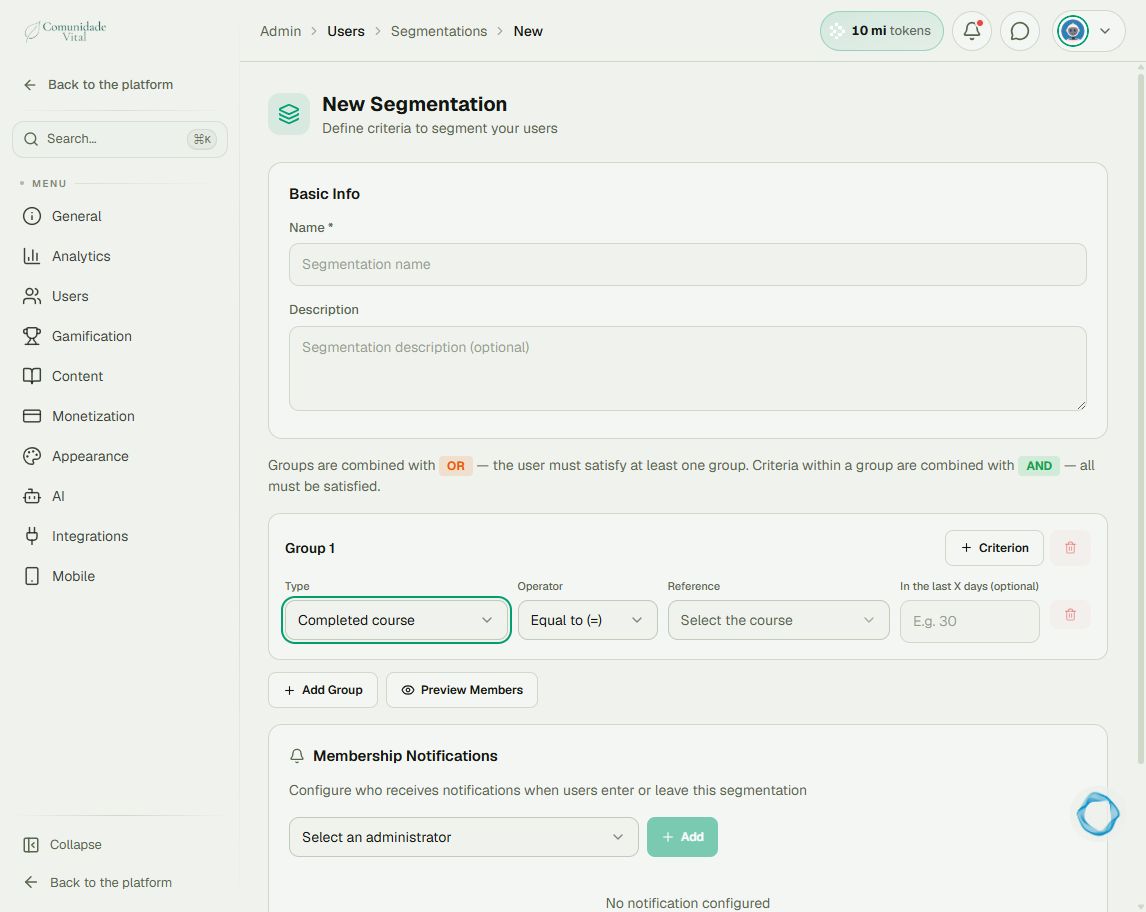
1Set the criterion and reference
Name the segmentation and choose Completed course under Type. Select the course under Reference. For a module, choose Completed module and specify its course and module. Do not use an unspecified reference when the question concerns particular content.
2Interpret the time window correctly
In the last X days defines a recent time window. A value of 30 finds recent completions, not completions older than 30 days. Leave it blank to omit this window. Criteria within one group use AND; separate groups use OR.
3Preview members before saving
Use Preview Members and check known users before Create Segmentation. Login days = 0 is different from Number of lessons completed = 0. Holding a badge may reflect manually granted access: do not label the list as buyers without checking its origin.
Tip
Before a bulk action, check the audience again. For individual progress, see How to track student progress.
Frequently asked questions
Does AI automatically create these criteria?
The segmentation editor does not offer that function. An assistant’s text suggestion must be checked against the actual criteria before configuration.