
Recurring subscriptions blocked by tokenization - what to check
Tokenization lets recurring billing use a reference to a card. In Cativa 2.0, recurring subscriptions require this capability to be enabled on the Asaas account. The platform checks the status; it is not a manual Cativa switch.
You need permission to view and manage this feature on your platform.
On the platform, open your profile picture and choose the administrative panel. Then follow: Monetization → Payment links → new or edit link → Payment mode.
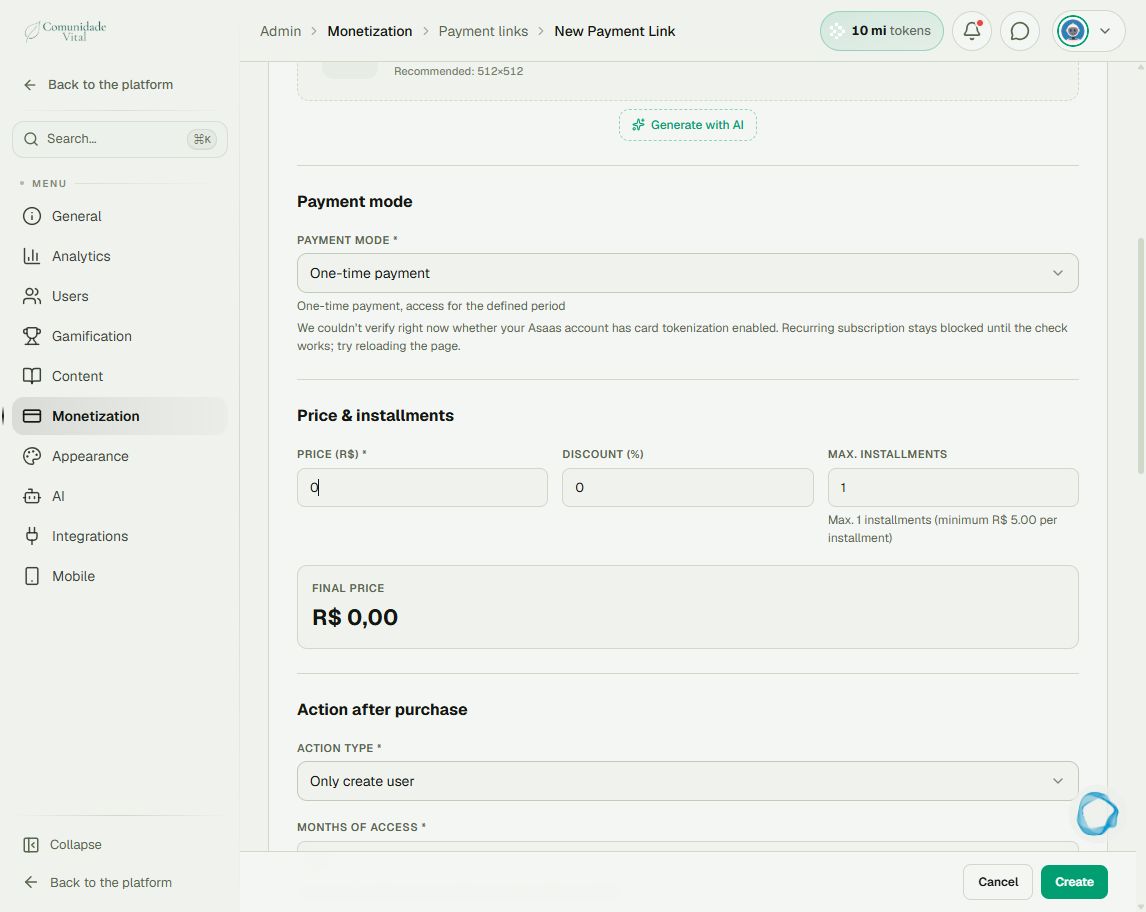
1Read the full message
In Payment mode, determine whether tokenization is disabled or its status could not be checked. The screenshot shows the second case. A failed check does not prove the capability is disabled.
2Address the reported status
If disabled, request enablement through the contact responsible for your Asaas account. If the status cannot be verified, reload and check again. If the problem persists, send support the displayed message and identify the integrated account, without sharing secret keys.
3Check availability on the link
After resolving the account status, reopen the link and confirm recurring mode is available. Review the cycle, delivery and remaining fields before saving. Do not change a one-time purchase merely to bypass a warning: it changes the billing arrangement.
Tip
For payment methods and arrangements, see Which payment methods the native checkout supports.
Frequently asked questions
Does enabling tokenization block recurring billing?
No. In 2.0, it is a requirement for recurring billing. Read the exact message to distinguish disabled from unverified.