Which actions send email or notifications
The platform uses email, push, and the notification bell for different purposes. An action may use one channel without using the others.
For example, an invitation sends email. A manual push can appear on a device and in the bell, depending on your settings. Do not expect every feature to produce the same result.
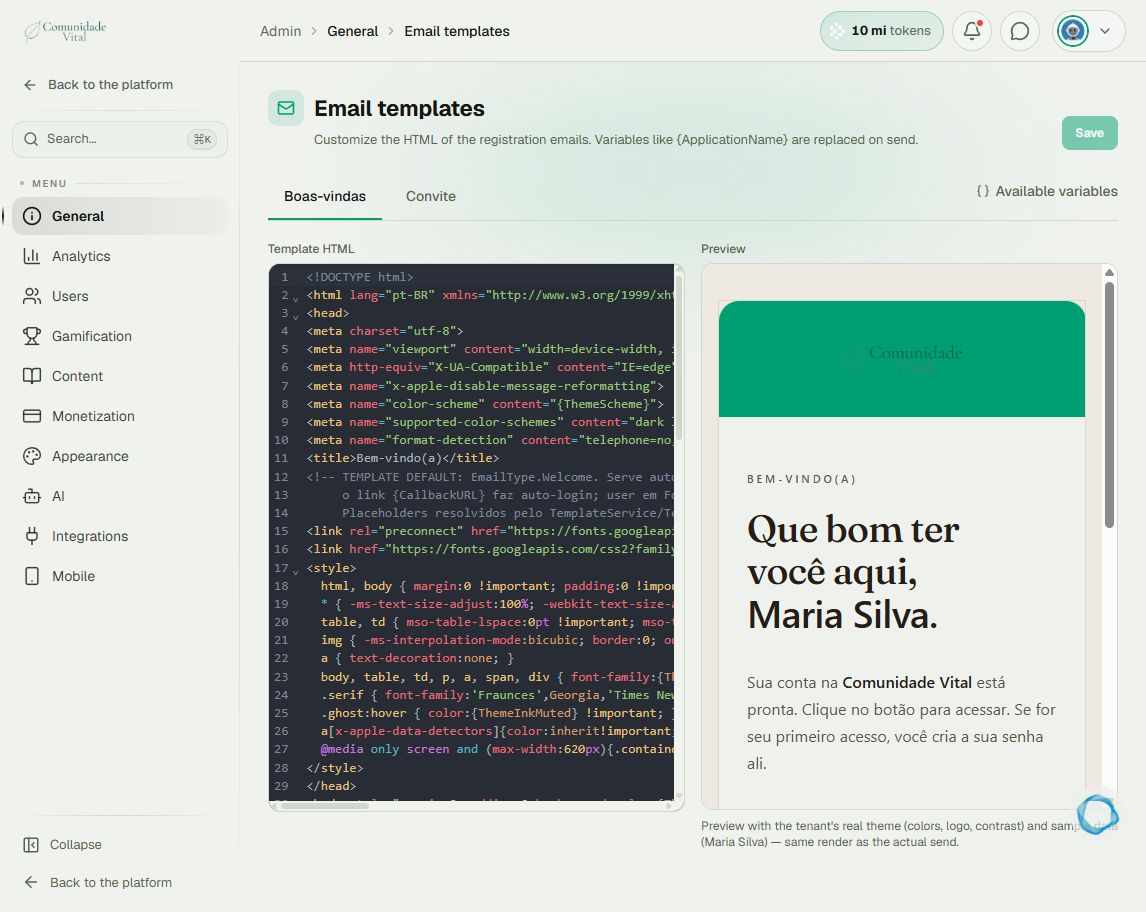
Click your profile picture in the top-right corner and open Admin panel. Use Search... in the sidebar to find the last item in this path: General › Email templates.
1Identify the expected email
Registration and user creation generate a welcome email; an invitation generates an invitation email; password recovery sends the requested link. Confirmed native checkout payments generate purchase confirmation. To edit registration email bodies, this page offers Boas-vindas (welcome) and Convite (invitation), which retain Portuguese labels. It is not a campaign sender.
2Distinguish push from the bell
For manual push, Save to in-app notifications determines whether the announcement also stays in the bell. Device delivery depends on available channels and notification permissions. Group posts require Notify users to send their announcement.
3Check the event before investigating failure
Record the action, intended recipient, channel, and time. For email, check the address and spam; for push, check audience and permissions. Changing a registered email does not automatically resend earlier messages.
Tip
For broad announcements, read the push article. Email marketing campaigns can use an external tool with an appropriate user export. For event-based rules, read Automations.
Frequently asked questions
Can I edit every email here?
No. This page offers Welcome and Invitation bodies; it does not edit all emails, subjects, or senders.
Is a renewal the same as a new invitation?
No. Renewal, purchase, and invitation are different events. Check subscription status and existing access.