
How to update a lesson while preserving progress history
Recording a lesson again does not require recreating its structure. Progress is linked to the existing lesson. For example, you can update an explanation while preserving records of who completed that lesson by editing the same content entry.
You need permission to view and manage this feature on your platform.
On the platform, click the custom Cursos (Courses) shortcut and open the course you manage. Follow: Cursos (Courses) → course → manage → Módulos (Modules) → existing lesson → edit.
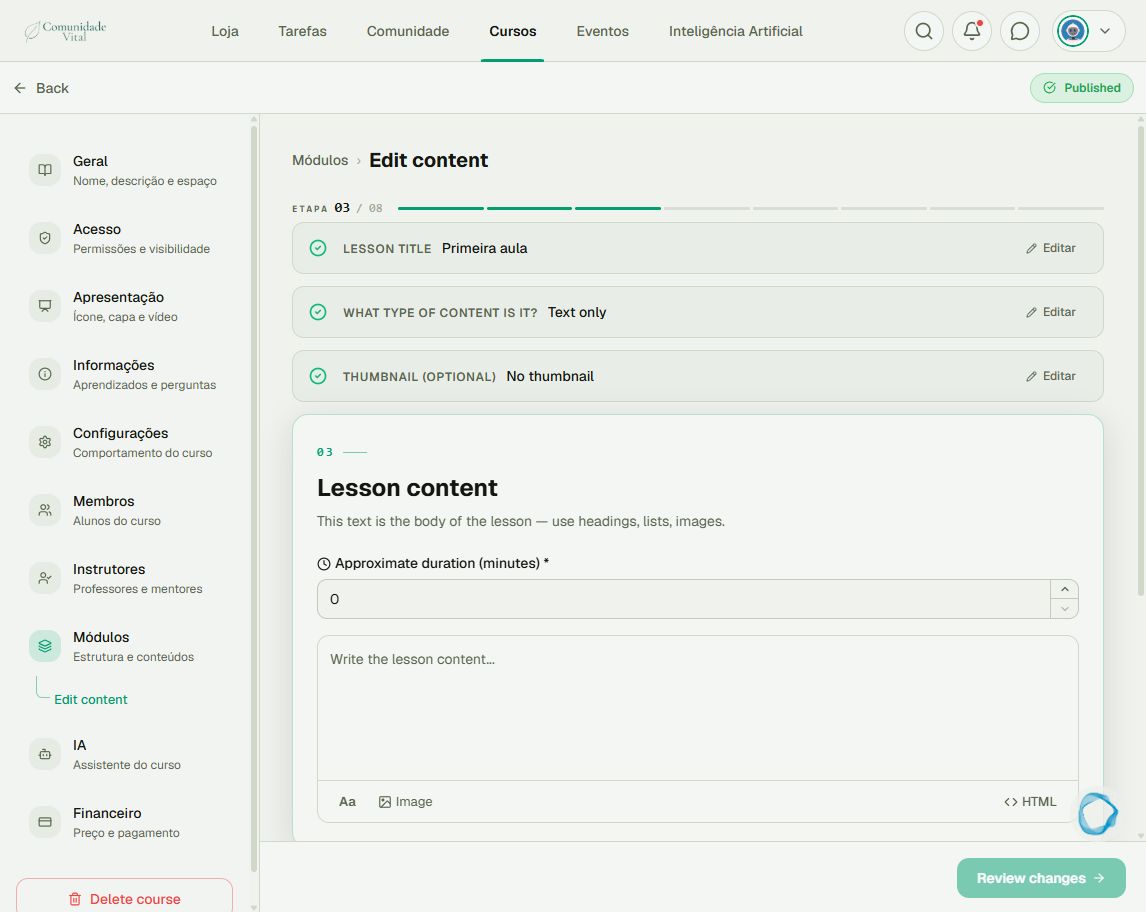
1Find the existing lesson
Open the course already used by members, enter its management area and locate the lesson under Módulos (Modules). Check its title and module before editing. Do not choose to add a new lesson when replacing one whose history you want to preserve.
2Update content in the same entry
Edit text or replace media within the existing lesson. Review changes and complete the editor’s save/publish flow. Recreating the course or lesson creates a different entry; previous progress does not automatically transfer to it.
3Check content and progress
Reopen the lesson to check the update. Inspect progress for a known member without marking the lesson for them. Editing preserves the existing completion record; it does not force everyone to redo the lesson. If you need a new activity with separate progress, plan a new lesson.
Tip
Migration to 2.0 and manually recreating lessons are different processes. If history appears missing after migration, collect the course, lesson and member details for investigation. See How to track student progress.
Frequently asked questions
Does importing members into a new course transfer progress?
Not automatically. Enrollment and progress are separate records. Granting access to a new course does not recreate previous completions.