
Root domain or subdomain - which DNS record should you use
Before changing DNS, identify the address you want to connect. A root domain and a subdomain are different: example.com can host your website while app.example.com opens your platform. Your choice determines which instructions apply.
Have your intended address ready and contact the person responsible for DNS. If the domain already serves a website or another service, identify that dependency before changing anything.
How to reach this screen
On the platform, open your profile picture in the upper-right corner and choose the administrative panel. In the sidebar, click Search... and look for Domain, under General. Open that result to reach the screen below.
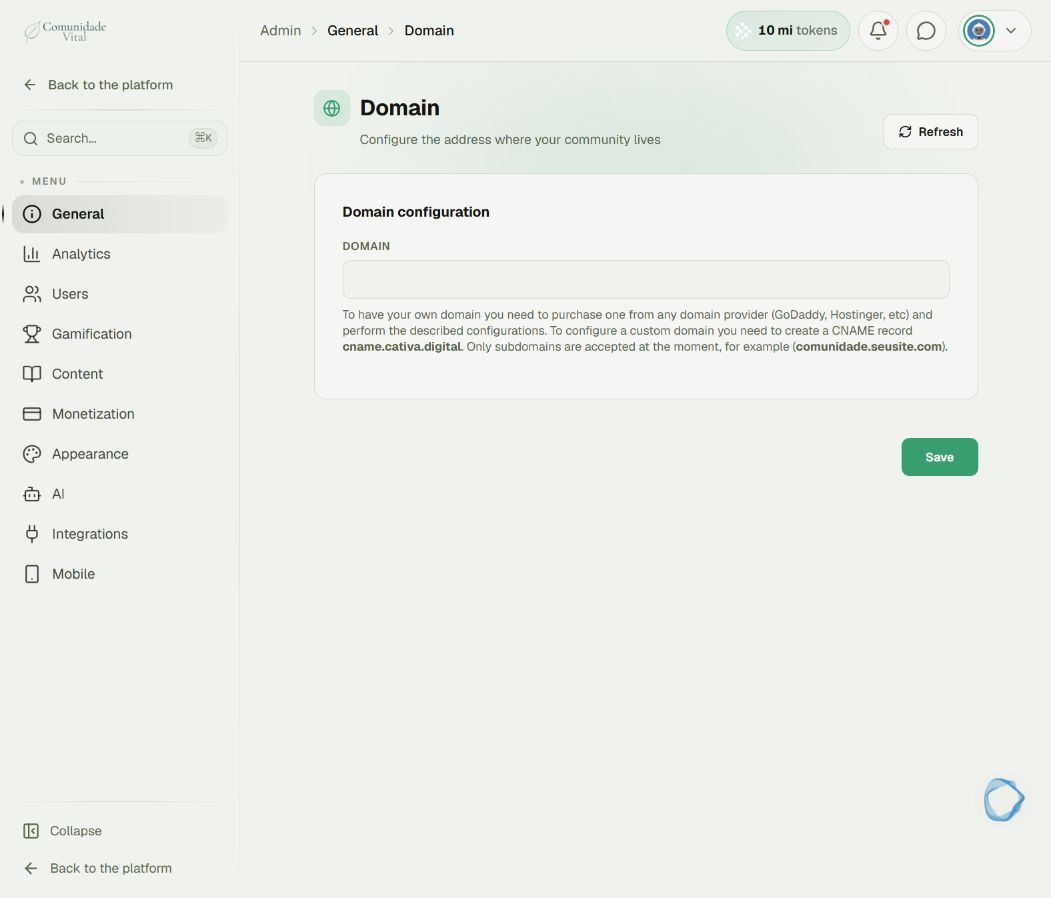
1Identify the type of address
example.com is the root domain. app.example.com is a subdomain. An A record points a name to an IPv4 address; a CNAME points to another domain name. Their values are not interchangeable.
2Follow the instructions shown in the panel
The current Domain screen states that only subdomains are accepted and specifies cname.cativa.digital as the target. For this case, use a CNAME record. Follow the complete instructions in How to set up a custom subdomain for your platform.
3Confirm root-domain setup before changing an IP record
Found instructions that use an IP address? Do not automatically apply that value to your subdomain. To connect a root domain, ask Cativa to confirm support for your account, the DNS target and how to register the address. Wait for those instructions before replacing records. Changing the root record can redirect the website already running there.
4Give support the right information
Provide the full intended address, who manages DNS, whether a website already uses that address and any message shown in Cativa. If you send a DNS screenshot, limit it to the relevant record. This helps support distinguish a configuration problem from a request to use a root domain.
Tip
You do not need to change your root domain to use your brand identity. An address such as app.example.com lets you configure the platform separately.
Frequently asked questions
Should the record name be @ or app?
At many providers, @ represents the root and app represents app.example.com. Check how your provider handles record names. For the subdomain flow described in Cativa, use your chosen subdomain name.
I changed the record and my website stopped working. What now?
Contact your DNS administrator with the previous values and the time of the change. They can assess restoring the correct record. Avoid further trial-and-error changes while identifying the affected service.