
How to adjust short answers and AI agent instructions
Adding more instructions does not always fix short answers. The response limit, model and available knowledge all affect the result. Use a known question, such as a recurring support issue, to compare changes.
You need permission to view and manage this feature on your platform.
On the platform, open your profile picture and choose the administrative panel. Then follow: AI → AI agents → Edit → Comportamento (Behavior).
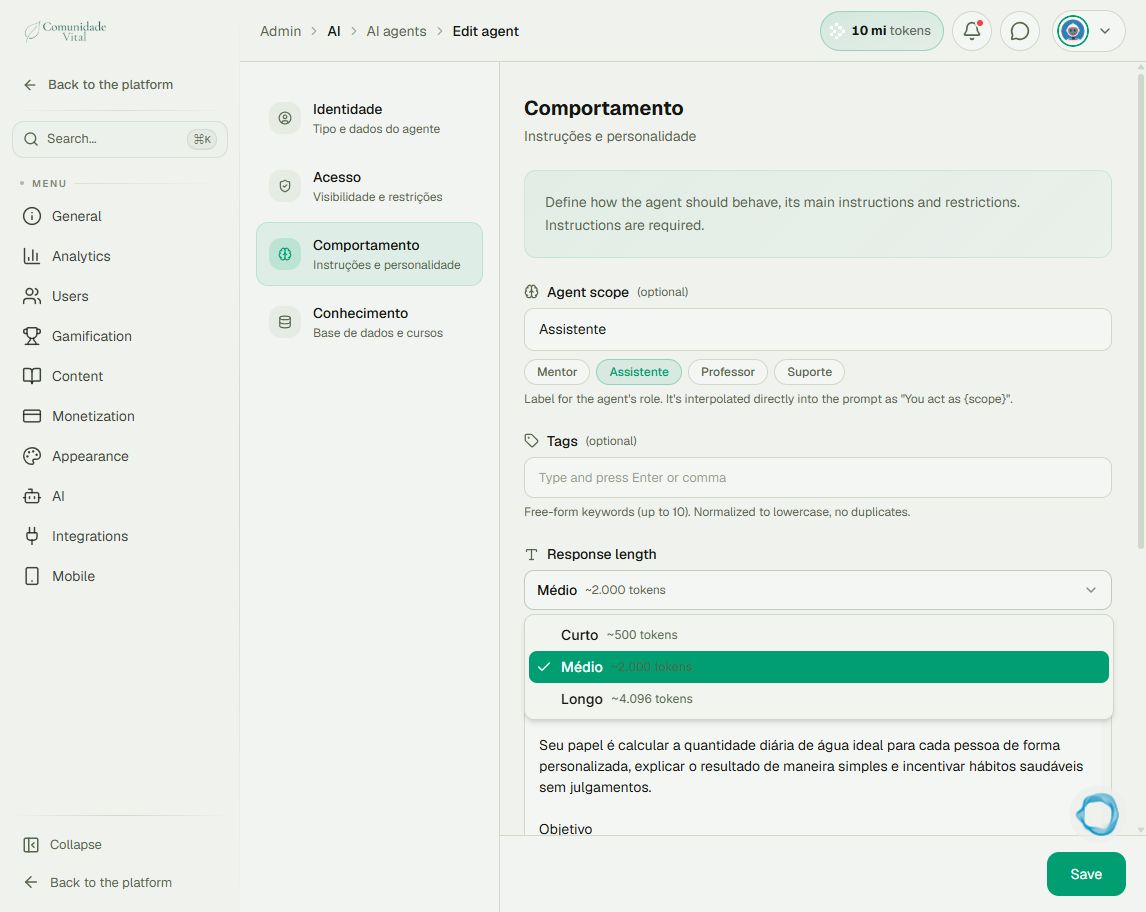
1Review response length
Open Response length. The options retain Portuguese names: Curto (short, ~500 tokens), Médio (medium, ~2,000) and Longo (long, ~4,096). Tokens are processing units, not an exact word count. A higher limit allows longer answers and can increase usage; it does not guarantee better quality.
2Organize instructions
In Instructions, describe the objective, examples and expected format. Use Restrictions for boundaries. Each field accepts up to 10,000 characters; exceeding the limit blocks saving. Do not confuse instruction characters with response tokens.
3Compare one change at a time
Check Advanced model and Conhecimento (Knowledge), save the change and repeat the same question. Compare with the same model and context. In a chat project, project knowledge can replace agent knowledge. Also check the AI Dashboard for balance or usage limits.
Tip
Use How to create an AI agent and add knowledge to organize knowledge and How to check AI credit usage to check usage.
Frequently asked questions
Will it match another assistant’s answer?
There is no guarantee. Model, context, instructions and knowledge can differ even when the question is identical.